
Alternate plans (variants)
A race plan can carry one or more variants — sibling strategies for the same race that share the race-level data (track, event start, ruleset, roster, availability, Strategy notes) but each carry their own stints, fuel/NRG inputs, and projection. Every plan ships with a Primary variant by default; it's the only one until you create an alternate.
When to use variants
- Pre-race A/B drafting. Build a fuel-saver variant alongside a push variant and compare projections before committing.
- What-if scenarios. "What does the schedule look like if we run 6 short stints instead of 4 long ones?" — draft it as an alternate without disturbing Primary.
- Incident recovery. Mid-race, hit Report Incident and the app generates 3–4 named recovery variants (shift only, tighten stints, drop last stop, optional splash and dash) for you to compare and activate. See Report an incident mid-race below.
Only one variant is active at any time. The active variant is what race-day surfaces use — driver race-day view, push-DM stint reminders, the public share link. Alternates are planning-only until you activate them.
The variant picker
On the plan-detail page and the captain stint builder, the action-row gets a variant picker to the left of the existing controls:
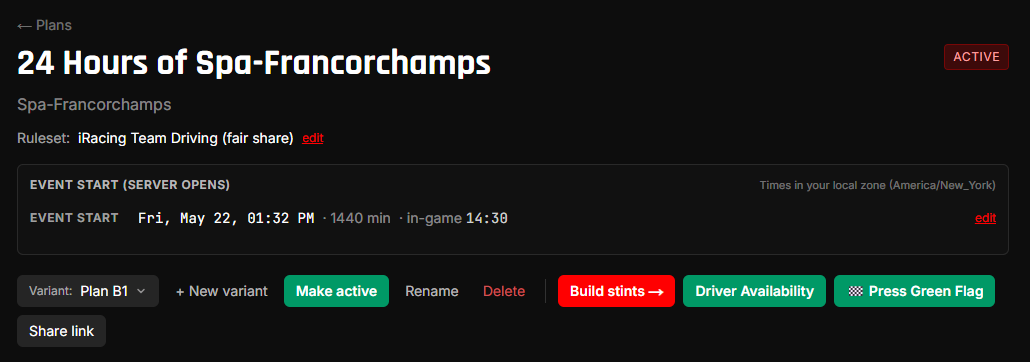
Click the picker to switch variants. Each row shows a ● for the active variant (and a ○ for non-active), the variant's name, an (active) badge, and the stint count.
Create a new variant
Hit + New variant. A small modal opens:
- Name — defaults to
Alternate N(auto-numbered to the next free slot). Leave blank to use the default; type a custom name if you want. - Copy stints from active variant — checked by default. Uncheck for a blank variant.
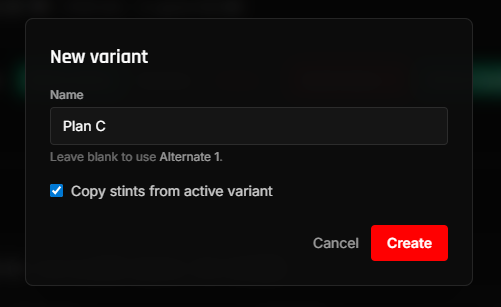
Hit Create. The new variant appears in the picker dropdown and you're now viewing it — the action row gains Make active / Rename / Delete buttons because you're viewing a non-active variant.
Compare variants side-by-side
Once a plan has two or more variants, the picker dropdown grows a ⇄ Compare variants… menu item below + New variant:
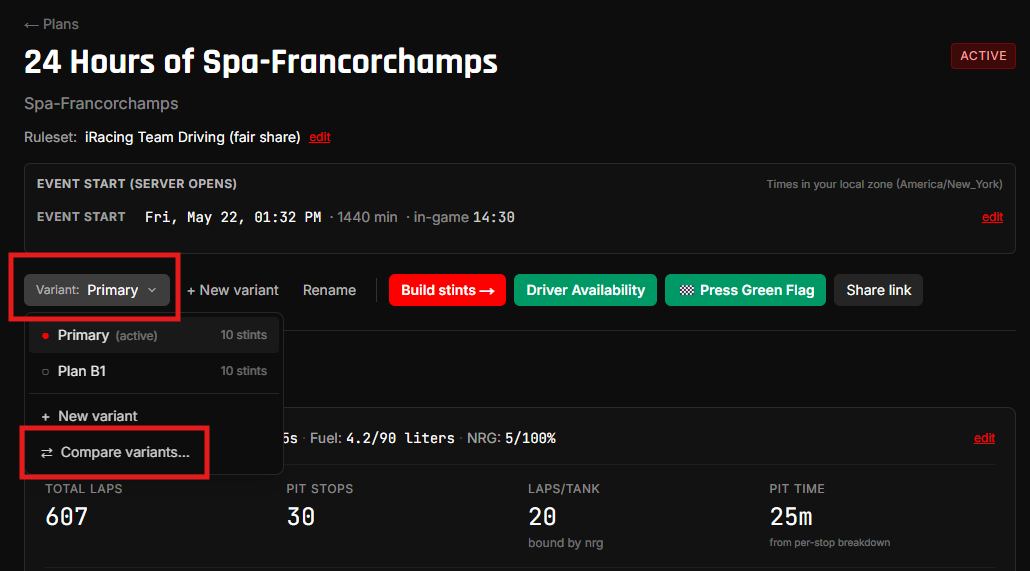
Click it to open the compare view at /teams/<id>/plans/<plan_id>/compare. By default the page loads all of the plan's variants (up to 4) into side-by-side columns:
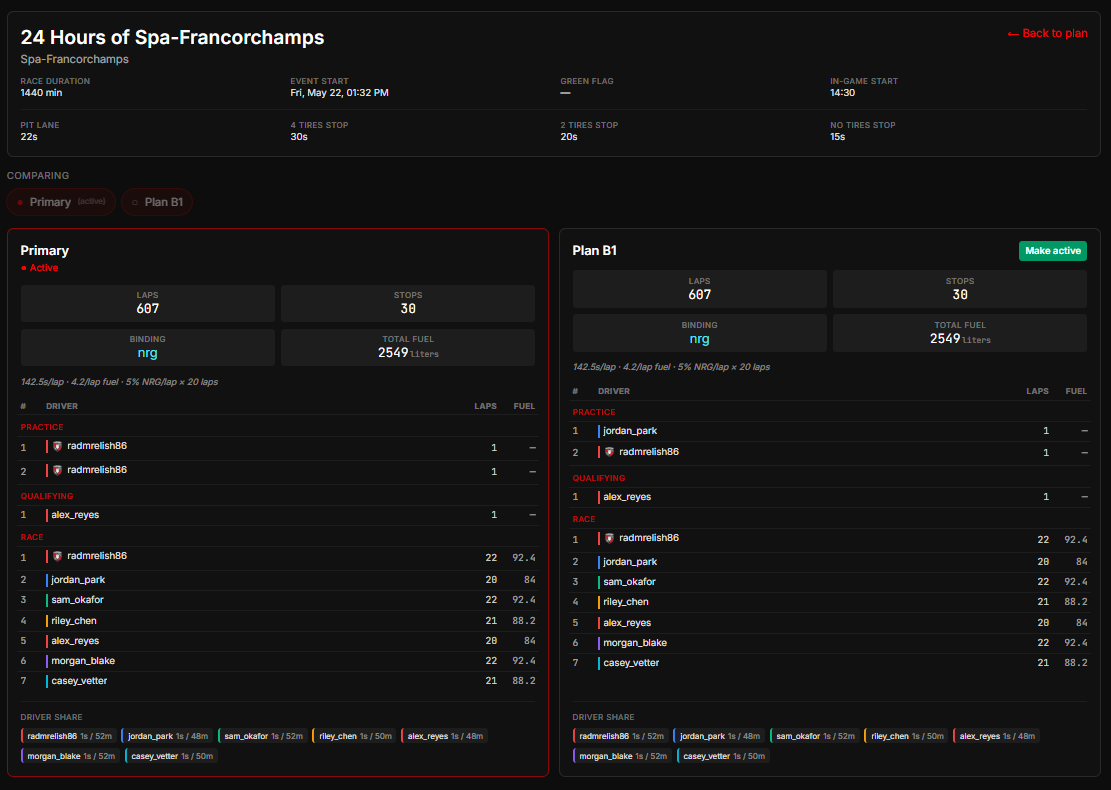
What's in the view:
- Context strip at the top — race-level data that's the same across every variant: race name, track, race duration, event start, green flag (when pressed), in-game start, and the pit-loss-per-stop cluster.
- Chip-toggle row — one chip per variant on the plan. Click a chip to include / exclude it from the compared set. Minimum 2 variants must stay selected; maximum 4 at once.
- Each column — variant name, active badge if applicable, Make active button on non-active variants, 4-up mini-stats (Laps / Stops / Binding / Total fuel), italic fuel-NRG inputs line so you can see why each variant projects differently, compact stints table (stint # / driver / laps / fuel), and a driver-share footer.
The URL carries the selected variant ids as ?variants=A,B,C — copy-paste a deep-link to share a specific compare set internally (the URL is captain-only; it doesn't expose anything race-day surfaces wouldn't already show through the active variant).
Make active works from compare view too — hit the button on whichever variant you want to promote and confirm. The page re-renders with the red ring on the new active column.
On mobile, the columns collapse into a vertical accordion — each variant shows its 4-up mini-stats at a glance, tap to expand for the stints table + driver-share + Make active.
Side-by-side reading, not auto-diff. This is a deliberate v1 choice — you read the columns and form your own opinion. If side-by-side reading proves too hard with real data, we'll revisit auto-highlighted deltas later.
Make a different variant active
While viewing the variant you want to promote, hit Make active. A confirm dialog opens warning that pending stint-reminder DMs will reschedule to the new variant (reminders already sent or in the bot's send queue can't be unsent).
After you confirm, the ● badge in the picker dropdown moves to the new variant and the Make active button disappears (you're now viewing the active variant). Push DMs reschedule automatically; the public share link starts serving the new active variant; race-day countdown reads the new active.
Rename or delete
- Rename opens a modal pre-filled with the current variant name. Edit + Save. Visible on every variant.
- Delete is light-touch — a confirm dialog naming the variant's stint-count blast radius. The race plan, roster, availability, share link, and Strategy notes are not affected. The active variant can't be deleted — activate a different variant first.
Race-day always uses the active variant
This is the load-bearing rule: switching variants in the picker is planning-only. The driver race-day view at /race/<plan>, the bot's /whoami and /next commands, and the push stint-reminder DMs all resolve through the active variant. Captain-only ?variant=<id> URL parameter doesn't leak to any driver-facing surface.
If you want a different variant to be what drivers see on race day, you have to Make active — there's no "preview as driver" toggle.
Report an incident mid-race
Things go wrong. A driver crashes and you lose 4 minutes in the garage. Manually duplicating the active variant and editing every stint to make the math work is too slow under pressure.
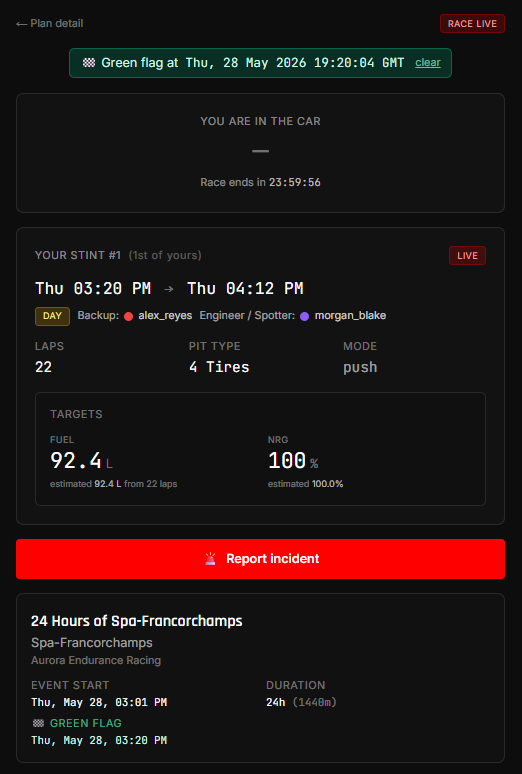
Hit "Report incident" from any of three web surfaces during the race window:
- Plan-detail page — in the action row beside the variant picker.
- Race-day mobile (
/race/<plan>) — full-width button below your stint card. - Compare view — top-right corner above the chip toggles.
…or from Discord without leaving your race-strategy channel — see Recover from Discord with /recover below.
The button is hidden outside the race window (race window = green flag if pressed, race_start otherwise → + duration). And it's open to any team member during the race — driver, engineer, spotter — not just admins. Whoever's at a screen when the incident happens can hit it.
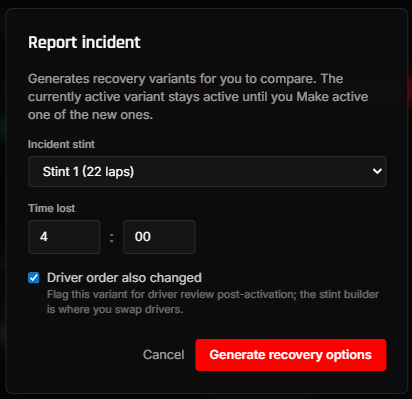
What the modal asks
- Incident stint — pick the stint that was in progress (or affected) when things went wrong.
- Time lost —
mm:ssof wall-clock the team lost. A 4-minute repair is4:00. Be generous; absorbing a slightly-too-large delay is safer than a slightly-too-small one. - Driver order also changed — check if the incident also affected who's driving next (sub needed, driver out, etc.). The flag tags the generated variants for review; the actual driver swap happens in the stint builder afterwards.
Hit Generate recovery options and the system creates 3–4 named variants and takes you straight to the compare view to pick one.
The recovery strategies
| Strategy | What it changes | When it helps | When it might fail fit-check |
|---|---|---|---|
| Recovery #N: shift only | Nothing structurally — same stints + drivers as active. The race just runs N minutes late. | You're absorbing the loss; drivers stay on their stints. | Always fits — no constraint to violate. |
| Recovery #N: tighten stints | Shaves laps off every stint after the incident to claw the lost time back. Race finishes near the original wall-clock. | Small-to-medium incidents where the lost time fits in the remaining laps. | ACC's 25-min stint minimum — shaving a stint below 25 min surfaces a red warning. |
| Recovery #N: drop last stop | Merges the last two stints into one longer stint. Saves one pit-stop's worth of pit-loss seconds. | When the merged stint can fit in the tank + a driver can run it. | Tank capacity; ACC max stint (60 min); fewer than 2 active stints. |
| Recovery #N: splash and dash (conditional) | Inserts a 1-lap splash before the final stint. The captain runs the second-to-last stint flat-out instead of fuel-saving; the splash tops up for the final dash. | Generated only when the active final stint is already short (1–5 laps) — classic splash-and-dash signature. | ACC 25-min floor on the shortened second-to-last; gate-skipped when the final stint isn't in 1–5 laps. |
Strategies that fail fit-check are still generated — they show up in the compare view with a red ⚠ Fit-check banner explaining what went wrong (e.g., "Stint 5 would be 18.3 min — below the ACC 25-min floor"). You can still activate them; the warning is there so you go in eyes-open.
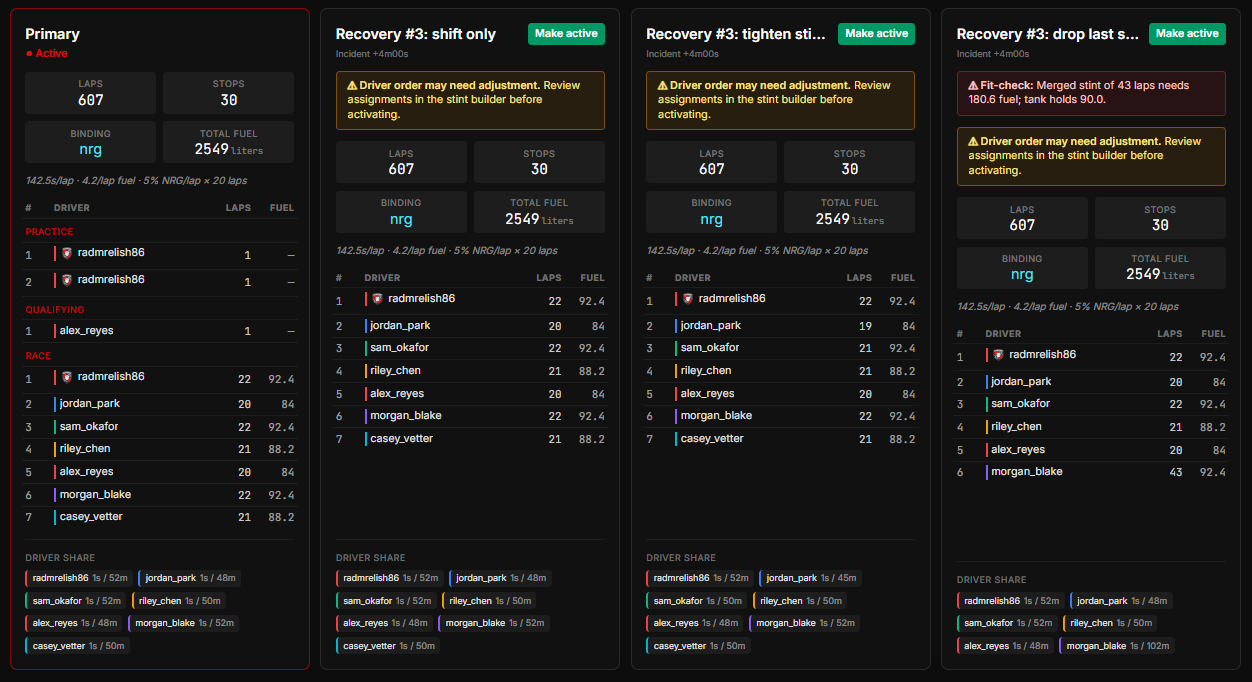
Pick one and Make active
Recovery variants land in the compare view alongside the currently active variant. Compare side-by-side, then Make active on the one you want. Alerts reschedule atomically, race-day mobile starts driving to the new schedule, and the public share link starts serving the new plan.
If the Driver order also changed checkbox was ticked when you generated the recovery, each generated variant carries a yellow ⚠ Driver order may need adjustment banner — reminder to open the stint builder and reassign drivers after activating. The recovery algorithm intentionally doesn't reshuffle drivers (it focuses on lap-count + fuel math); you know who's available.
Recovery variants stay in the picker forever, like every other variant. The picker auto-collapses non-active variants post-race so the dropdown stays readable, but the audit trail (what incident? what delay? what did the team pick?) is preserved.
Recover from Discord with /recover
When the incident happens you're often heads-down in the race, not on the StintIQ tab. The bot gives you the same recovery generation without leaving Discord:
/recover stint:4 lost:1:30 driver_order_changed:false
- stint — the race stint number the incident happened on.
- lost — time lost, as
mm:ss(e.g.1:30) or plain seconds (e.g.90). - driver_order_changed —
trueif the incident also changed who drives next (same flag as the web modal). - team (optional) — only needed if you're on more than one team; otherwise the bot picks your active race automatically.
The bot generates the same 2–4 recovery variants and replies (privately, just to you) with each strategy, a ✅/⚠️ fit-check, and an Open compare view → link straight to the compare page where you pick one and Make active. Like the web button, /recover only works during the race window, and the API gates it the same way (admins anytime; any team member during the race).
You can run it in your team's race-strategy channel (Guild Install) or in a DM with the bot (User Install) — see Discord setup for both paths.
Have questions? Join our Discord →