
Your role on the team
If you're new to being an engineer or spotter in StintIQ, here's what the role does and what to expect.
What's the engineer / spotter role?
In sim racing, the engineer (or spotter, depending on the series) is the person who supports a driver during their stint over voice comms — calling out lap times, incident warnings, pit-stop strategy, weather changes. You're not in the car; you're next to it.
StintIQ treats engineer / spotter as a per-stint assignment, not a team-wide role. Your team admin assigns a teammate (often a non-driving driver, or a dedicated comms person) as the engineer for a specific stint. The same person can be a driver on stints 1 and 3, and an engineer for stint 2 — flexible per stint.
This is independent of your team role badge (Owner, Admin, or Driver). Anyone on the team can be an engineer on any stint.
How you'll find out
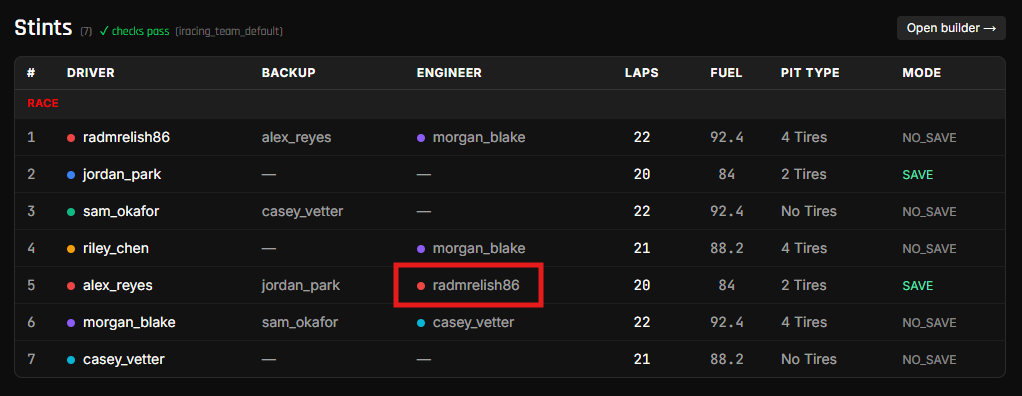
Your team admin sets up the assignment in the stint builder before race day. You see it in two places:
- On the plan's stints table — the Engineer column shows your name on rows where you're assigned.
- On the race-day mobile view (the
/race/{plan_id}page from the share link) — your stint card shows up labeled "Engineering [driver's] stint" rather than "Primary driver."
What you do during the stint
In game (or on voice comms with the driver), you handle whatever the team has agreed on. StintIQ doesn't drive what you say — that's your team's playbook.
What StintIQ does do:
- DMs you at T-30, T-15, T-5 to remind you when the stint is about to start (same cadence as the driver — see Stay alert (Discord DMs) in the Driver Guide).
- Surfaces your stint on the race-day mobile view so you can see lap range, fuel target, NRG target, and pit-type at a glance.
Next steps
- Race day as an engineer — What the race-day mobile view looks like from an engineer's perspective.
- Stay alert (Discord DMs) — Link your Discord so the bot can DM you (same link flow drivers use).
Have questions? Join our Discord →