Build a race plan
Once your team exists, the next step is to build a race plan. A plan holds the race-day settings — duration, start time, fuel math, ruleset — and is where you'll assign stints to your drivers.
Pick a template (or start blank)
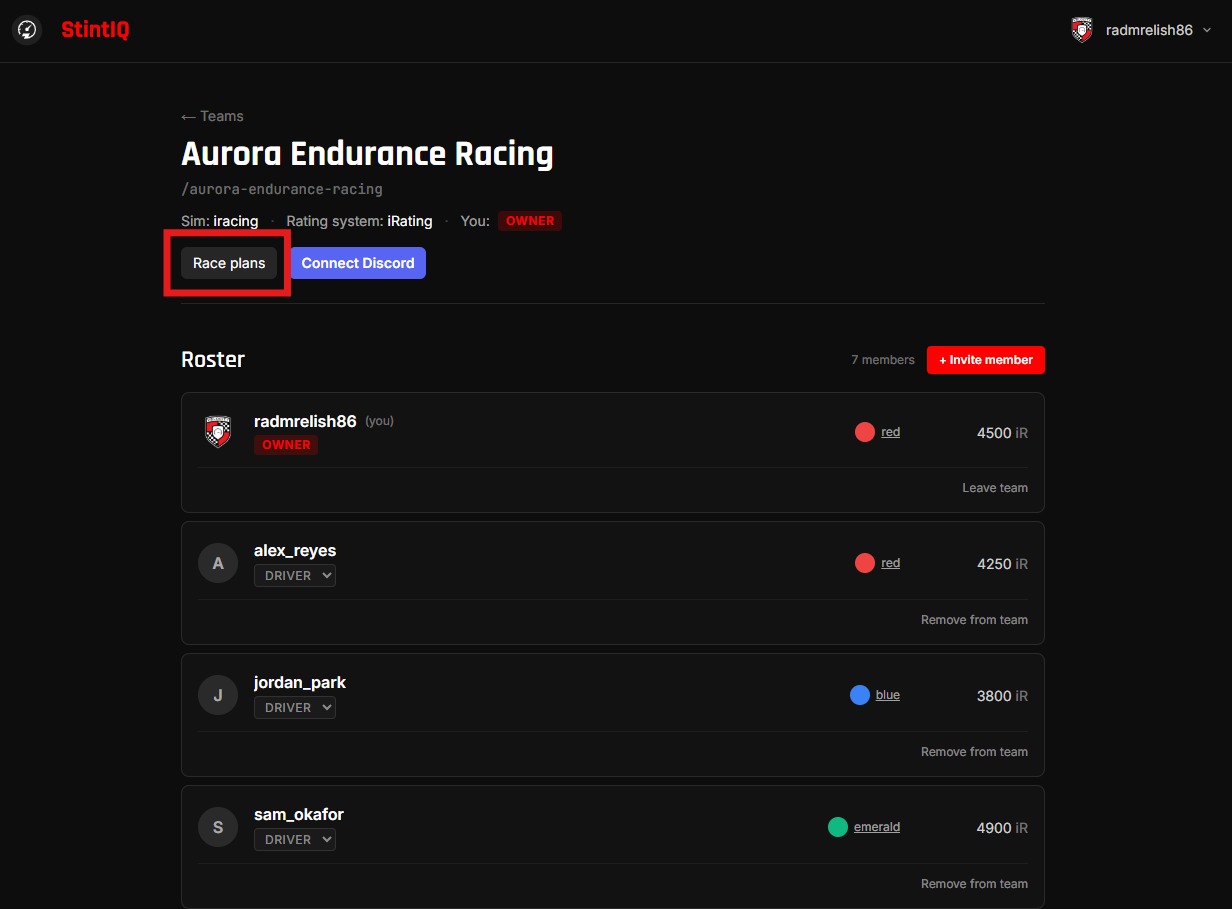
From your team detail page, click Race plans → + New plan.
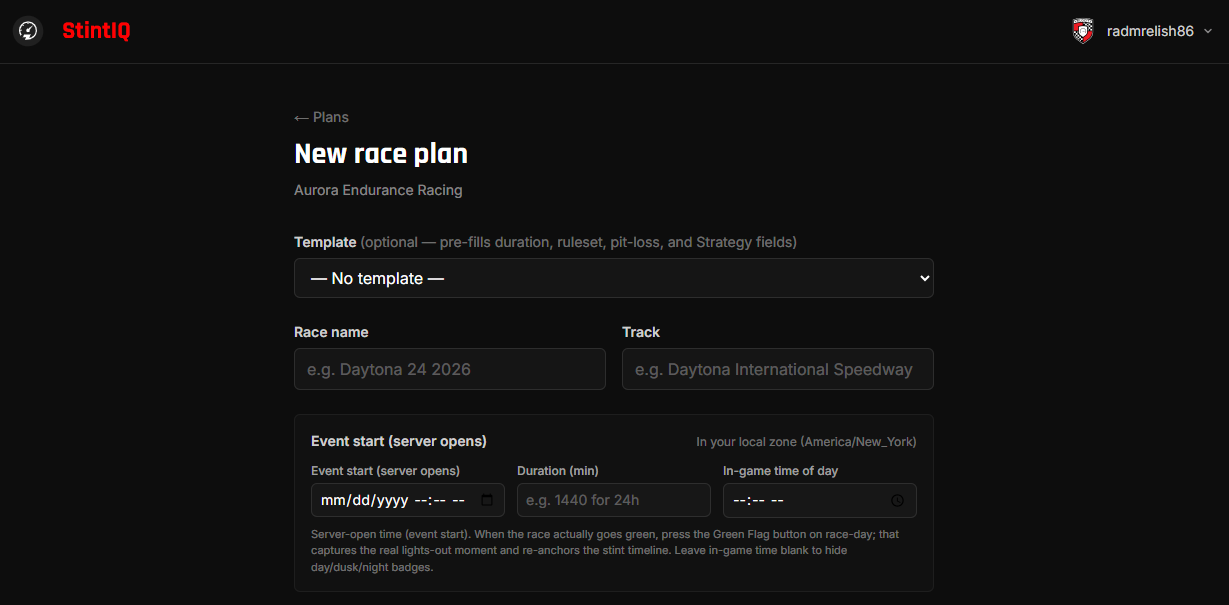
The form opens with a Template dropdown at the top. Templates pre-fill the most common settings for a given race format:
- IMSA 12 Hours, WEC 6 / 8 / 24 Hours, NEO 24H Series — pre-fill duration plus iRacing-baseline pit-stop timings (30s pit lane + 15s tires).
- ACC Endurance 6h — pre-fills ACC-specific pit timing (28s lane + 12s tires).
- Custom — leaves everything blank. Pick this if you're planning a one-off enduro.
You can override any pre-filled value after the template loads — the template is just a head start.
Fill in the race details
- Race name + Track — public identifiers that show up on the plan detail page and on share links.
- Event start (server opens) — date and time the server opens for the race weekend, in your local time. We store as UTC and convert back for each viewer. This is the time published by your league or visible in the sim's session schedule; the actual lights-out / green flag moment is captured separately on race day via the Green Flag button.
- Duration — total race length in minutes. Pre-filled by template; override for non-standard formats.
- In-game time of day — optional. The in-sim clock time when the race goes green. Drives the day/dusk/night badge on each Race stint. Leave blank to hide the badges.
- Ruleset — which fair-share + stint-length rules apply (iRacing team default, 24H Series, ACC endurance default, generic, or custom). Drives the validation panel.
Fill in the fuel math
- Avg lap seconds — your team's expected average lap time.
- Fuel per lap — liters or gallons (per the team's fuel unit).
- Tank capacity — the car's fuel tank size.
- Fuel unit — liters or gallons.
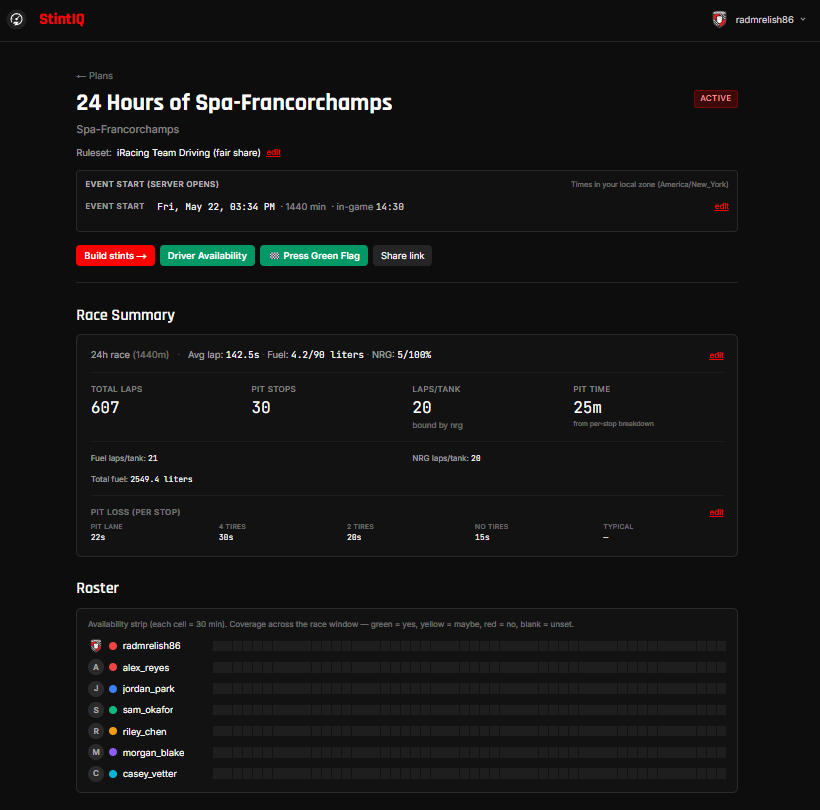
These four feed the projection panel on the plan detail page (laps per tank, total stops, total pit time).
NRG / Hybrid
This section matches your team's sim. What you see depends on which sim you picked when you created the team:
- ACC teams — this section is hidden entirely. ACC has no hybrid energy mechanic, so there's nothing to enter.
- iRacing teams — only the Hypercar option appears (iRacing's only NRG-aware class).
- LMU teams — all three options appear: Hypercar, GT3, and LMP2.
- Other sims (rFactor 2, AC, Automobilista 2, or any free-text "Other") — all three options appear, in case your league uses NRG conventions from one of the above.
Expand the + NRG / Hybrid fold-out and pick the matching car class:
- Hypercar (LMH / LMDh) — Enter NRG per lap (%). The full 100% hybrid budget is implicit, so there's no second input.
- GT3 (LMU GT3) — Enter NRG per lap (%) and the BoP lap budget per stint (e.g. 5 laps). The effective NRG capacity is laps × per-lap.
- LMP2 (LMU LMP2) — Same shape as GT3. Enter NRG per lap (%) and the BoP lap budget. LMP2's per-stint energy cap is set by LMU's rulebook, just like GT3.
For the underlying math, see Reference → NRG and car class.
Pit loss (optional)
Expand the + Pit-loss budget fold-out to enter per-stop timings (pit lane + with tires + without tires + 2 tires). These let the projection compute total pit time accurately. Pre-filled by template; defer if your team typically averages pit losses across a single number.
For more on the math, see Reference → Fuel calculator explained.
Save and continue
Click Create plan. You'll land on the plan detail page, ready to assign stints.
See who's free while you build
Once your drivers have filled in the availability grid, the stint builder shows who's free for each stint right on the card — no flipping back and forth. Every driver, backup, and engineer dropdown is tagged with a coloured dot for that stint's time window:
- 🟢 free — marked available for the whole window
- 🟡 maybe — marked maybe
- 🔴 said no — marked unavailable for part of the window
- ⚪ not set — hasn't filled in availability for that window
If the driver you've already assigned marked themselves No for their stint, the row flags it with a ⚠ said no badge so a conflict jumps out at a glance; a driver who's free shows a green ✓ free.
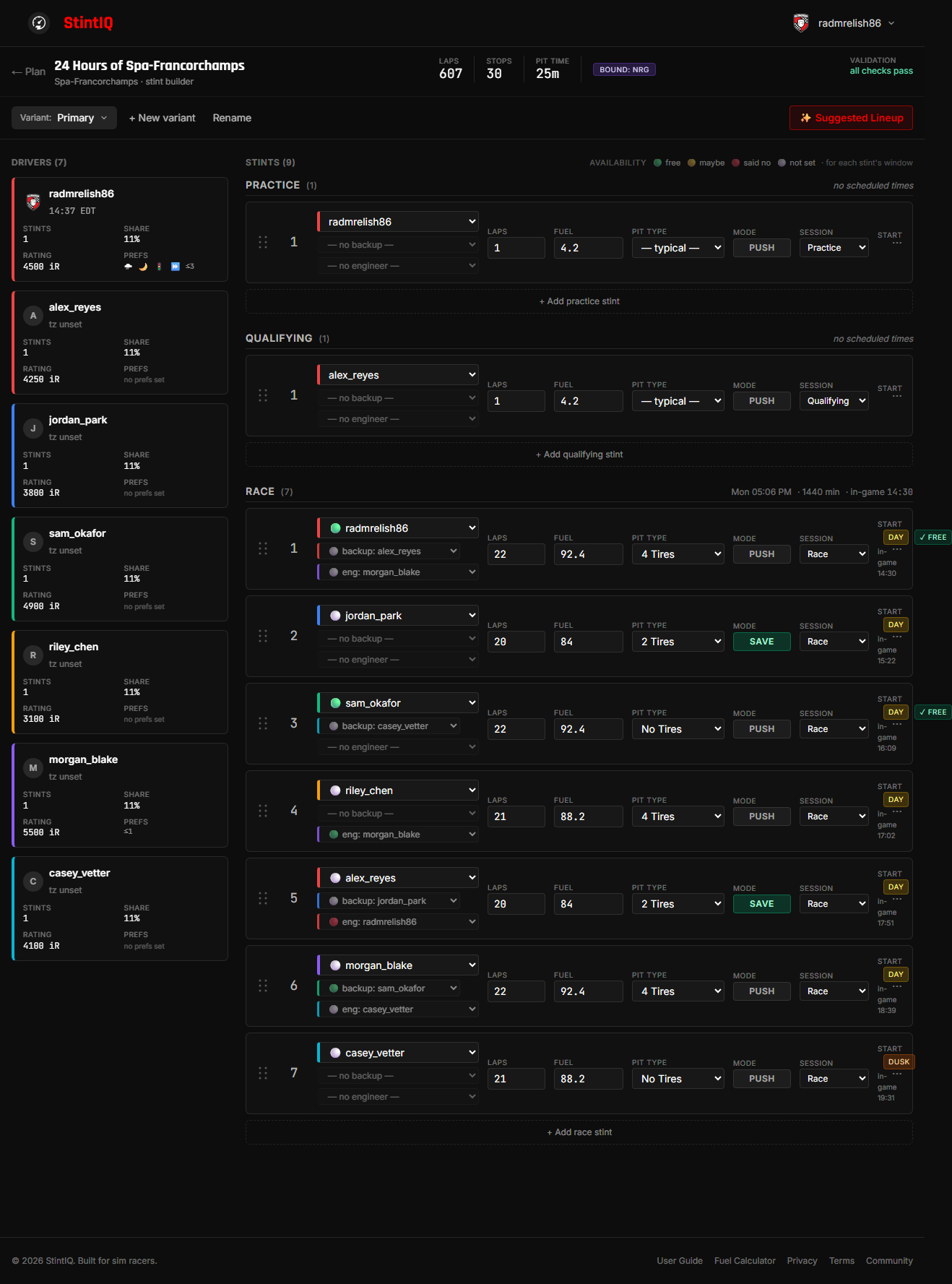
Times on each row are shown in your own local timezone, so the whole plan reads in one clock no matter where your drivers are. Availability only applies to Race stints — Practice and Qualifying rows show plain names, since the grid covers the race window.
Suggest a lineup from availability
Hand-matching "who's free at 03:00" to twenty stints is the biggest chore in a long enduro. If your drivers have filled in the availability grid, StintIQ can do the first pass for you.
In the stint builder, click ✨ Suggested Lineup.
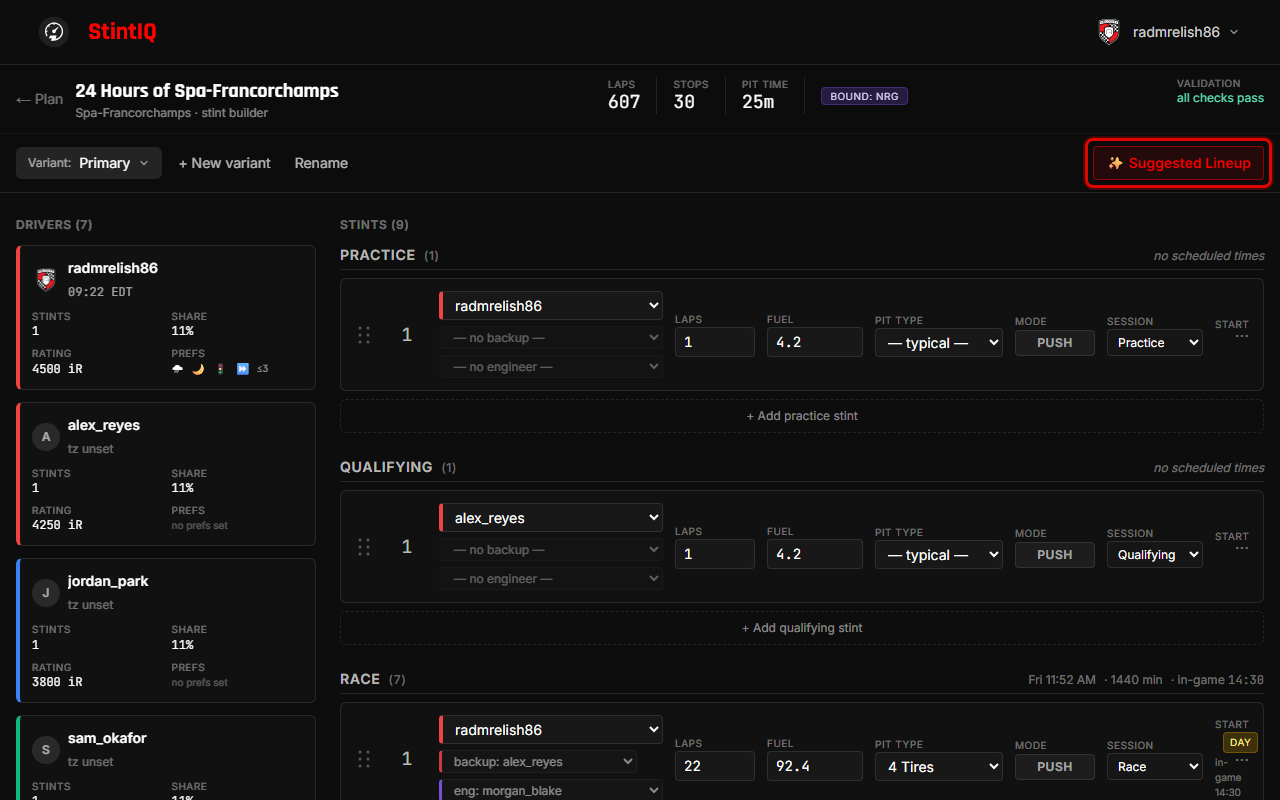
A review panel opens with one row per race stint — the driver currently assigned, the driver we'd suggest instead, and a short why. Suggestions favour drivers who marked themselves available for that stint's window, spread seat time evenly, respect each driver's max-consecutive-stints limit, and match night / race-start preferences.
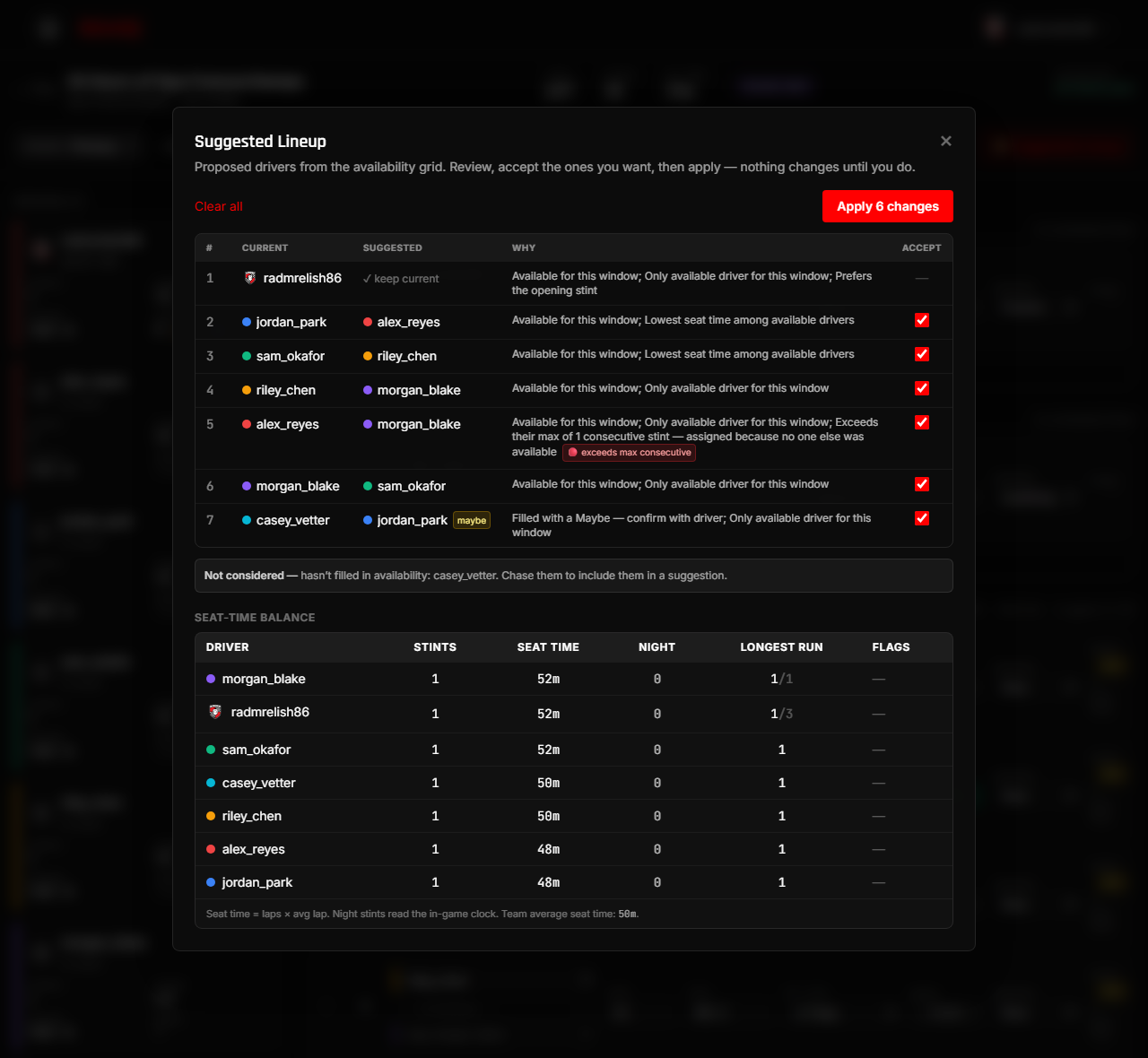
A few things to know:
- Nothing changes until you apply. Tick the rows you want (changed rows start ticked), or hit Accept all suggested, then Apply. Each accepted row goes through the same checks as a manual edit.
- Only drivers who filled in availability are considered. A teammate who hasn't marked anything is listed under Not considered — chase them for their availability, they're never auto-assigned.
- A "maybe" tag means the only fit for that stint marked themselves maybe — confirm with them before counting on it.
- An unfilled stint means no one was available for that window. It's left for you to assign by hand.
- The seat-time balance below the table updates after you apply, so you can see the lineup get fairer.
- Want another pass? After applying, click ↻ Suggest again to re-run against the new lineup. Re-running can rebalance seat time, but it won't clear a flag that's unavoidable — if a driver is the only person available for two back-to-back stints, the "exceeds max consecutive" flag stays until you add availability, relax that driver's limit, or move the stint by hand. The suggestion surfaces the constraint; it can't invent a driver who isn't free.
Suggest a lineup as a starting point, then fine-tune by hand in the builder.
Check the driver workload
Once stints are assigned, scroll to the Driver workload panel on the plan detail page. It turns "who's driving how much" into one glance, with a row per driver:
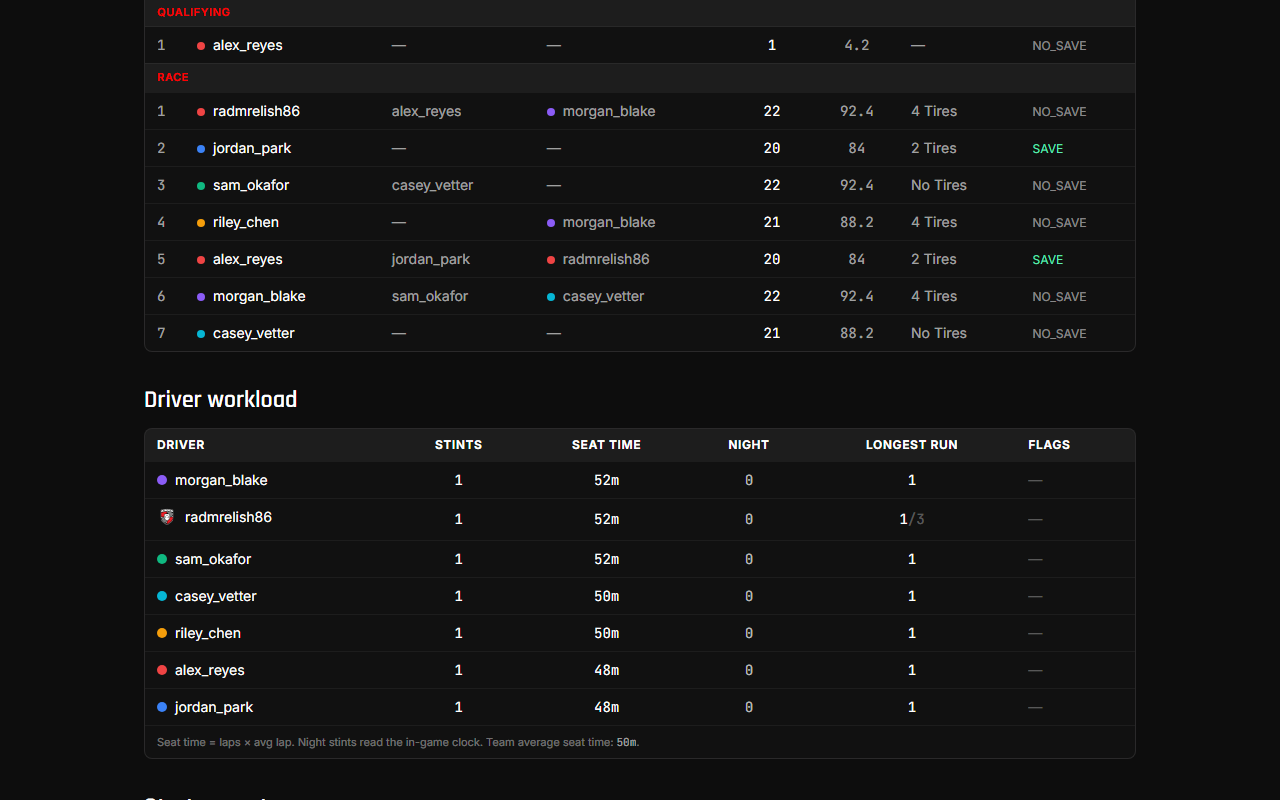
- Stints — how many race stints they drive.
- Seat time — total time in the car (laps × average lap).
- Night — how many of their stints fall in the in-game night. (Shows a dash until you set an In-game time of day on the plan — that's what tells us when night is.)
- Longest run — the most stints they run back-to-back, shown against their personal max (e.g.
3/2). - Flags — a red flag when someone exceeds their max consecutive stints, and a soft flag when a driver is well above or below the team's average seat time. Hover any flag for the reason.
Use it to spot an unbalanced lineup — someone barely in the car, or one driver carrying every night stint — and fix it in the builder before race day. The panel always reflects the variant you're viewing, so you can compare the balance of an alternate plan before making it active.
Next steps
- Invite drivers and engineers — Share an invite link so teammates can sign up for availability + claim stints.
- Connect to Discord — Wire up race-day DMs.
- Run race day — Race-day checklist.
- Alternate plans (variants) — Draft sibling strategies for the same race + switch which one is active.
Have questions? Join our Discord →