
Race announcements in your team channel
Besides the DMs each driver gets, StintIQ can post race-day updates in a channel of your team's Discord server, so the whole team can follow along in one place: the lineup before the race, lights out, and any driver who drops out. Drivers keep getting their own DMs either way.
Before you start
You need two things, both one-time:
- Your team is connected to its Discord server. See Connect to Discord.
- The StintIQ bot is installed in that server, not only on your own Discord account. Use Install bot in server on your team page, or see Discord setup.
Only a team Owner or Admin can set up announcements.
Set it up
In Discord, go to the channel you want the posts in and run:
/team announce here
If you're on more than one team, pick the team in the team: option.
The bot checks it can post there before it saves anything. If it can't, it tells you why, privately:
- Not a text channel. Announcements can't go in a thread or a voice channel's chat.
- Missing permissions. The bot needs View Channel, Send Messages and Embed Links in the channel. The reply names the ones it's missing; add them under Edit Channel → Permissions, then run the command again.
- Bot not in the server. The reply includes a link to install it.
- Wrong server. Your team is connected to a different Discord server. Run the command there, or change the team's server on the team page.
When it works, the bot posts a confirmation in the channel for everyone to see, listing what will post there.
If everyone in the server can see the channel, including people who aren't on your team, you'll also get a private heads-up. Posts show only the lineup, names and times, never fuel or lap numbers, but if you'd rather keep them inside the team, use a private channel and run the command there instead.
What gets posted
Race day, 1 hour before the server opens
The race's key times (server opens, qualifying, lights out, finish) and the full race lineup, stint by stint, with each backup.
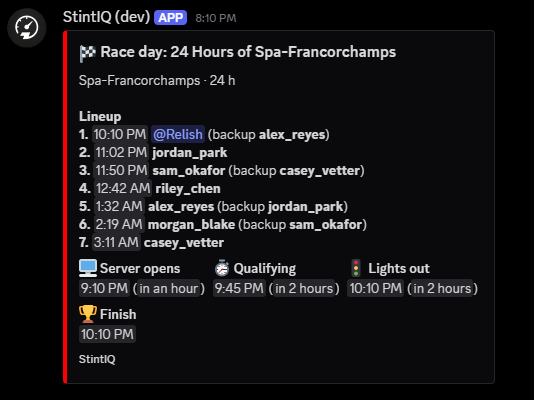
Times are Discord timestamps, so everyone in the channel sees them in their own time zone. If the plan has no lap time yet, the lineup goes out without stint start times.
If you set up the channel less than an hour before the server opens, there's no race-day post for that race. The other posts still go out.
Lights out
When someone presses 🏁 Press Green Flag (see Run race day), the channel gets a short post naming the opening driver, for example "🚦 Lights out! Spa 24h is green. @Alex has the first stint." Pressing it again posts nothing more.
A driver can't make it, or a backup answers
When a driver presses ⚠️ I can't make it on their reminder, the channel hears about it straight away, along with whether the backup has been asked, for example "❌ Jo can't make Stint 5. Backup Sam has been asked to stand by." The channel also hears when that driver changes their mind, and when a backup says they can or can't stand by.
A driver's first ✅ I'm ready doesn't post: that's the normal case, and the board on the race-day view already shows it.
Driver changes (optional)
Turn on Driver-change posts on your team page and the channel also gets a post about 5 minutes before each race stint with a new driver, saying who takes over from whom and whether the driver and backup have confirmed. It's off by default because it's the busiest post.
How names show
Someone who's in your Discord server shows as a Discord mention. A mention inside these posts doesn't ping anyone. Anyone else shows as their StintIQ name in bold.
The team page
Your team page has a 📣 Race announcements box between the header and the roster.
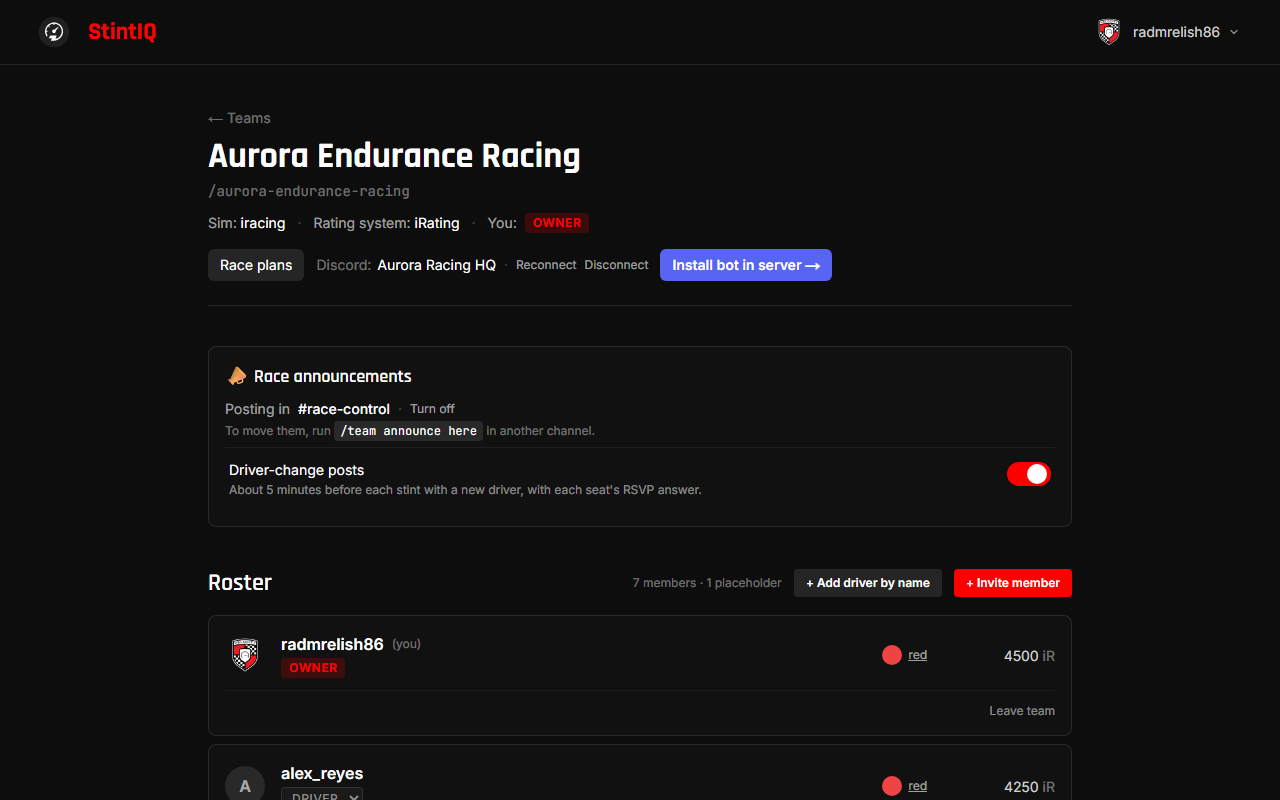
- Captains see which channel the posts go to, Turn off, and the Driver-change posts switch. Before setup, the box says how to set it up.
- Drivers see only which channel the posts go to, and nothing if there isn't one.
Move or turn off announcements
- To move them, run
/team announce herein the new channel. Posts already queued go to the new channel. - To turn them off, click Turn off on the team page, or run
/team announce offanywhere. Posts already queued are dropped. Drivers still get their DMs. - Changing your team's Discord server (Reconnect to a different server, or Disconnect) also turns announcements off, because the channel belongs to the old server.
Turning announcements off keeps your Driver-change posts choice for next time.
If a post fails
If the bot can't post in the channel, for example because its permissions were changed or the channel was deleted, every Owner and Admin gets a DM, at most once per race:
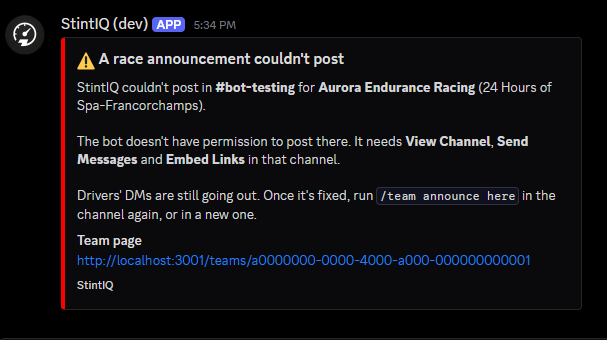
The team page shows a red warning with the time of the failure and what to do:
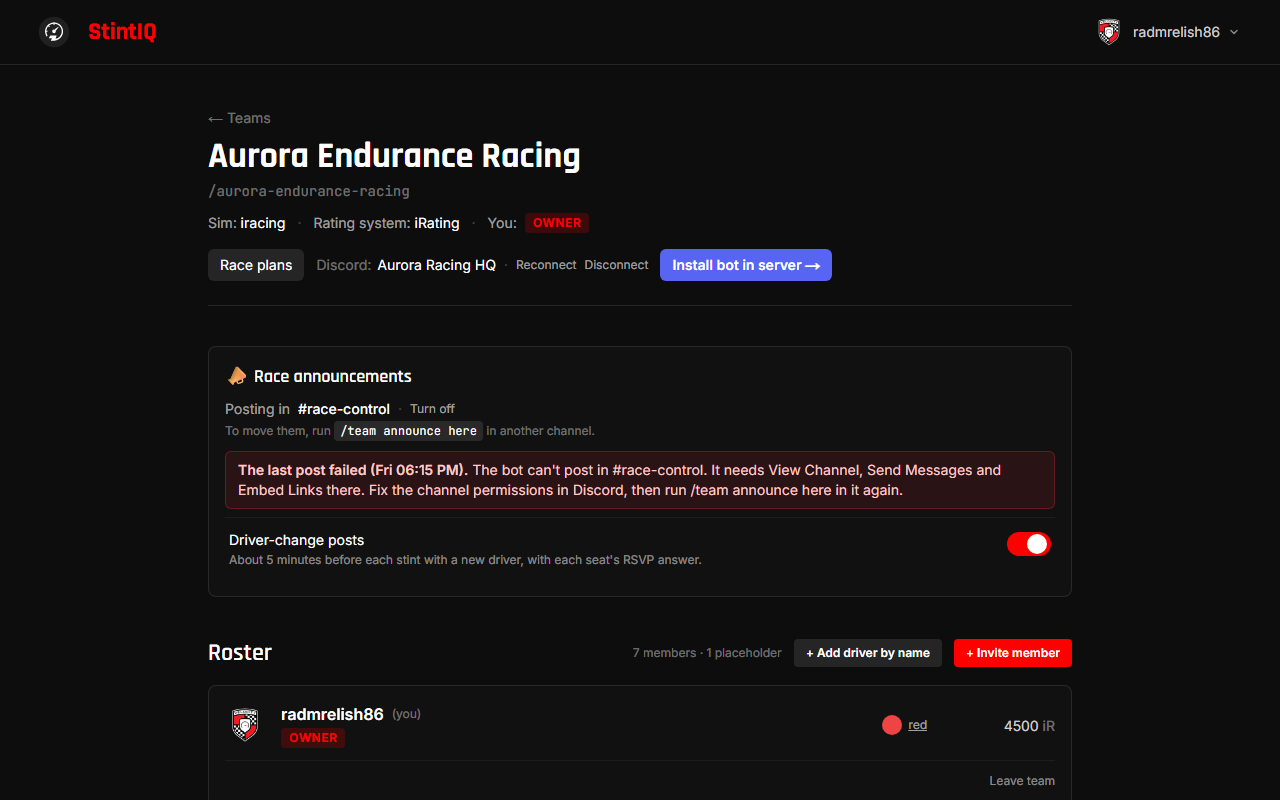
- Missing permissions: give the bot View Channel, Send Messages and Embed Links in the channel, then run
/team announce herethere again. - Channel deleted, or bot removed from the server: run
/team announce herein a channel to pick a new one. - A Discord problem: nothing to do. The bot already retried, and the next post tries again.
Announcements stay on while the warning shows. It clears by itself when the next post goes through, or when you run /team announce here again. Drivers' DMs keep going out the whole time.
Next steps
- Run race day: the race-day checklist, Green Flag and RSVPs. See Run race day.
Have questions? Join our Discord →