
Race day with the agent
When your team runs the StintIQ Telemetry Agent, the race-day page and the plan page show the race live against the plan: who's in the car, where the stint stands, when the next stop is due, and whether the fuel will last. It's the same Live card on both pages, for everyone on the team, on races in iRacing or Le Mans Ultimate. The page checks for new data every 10 seconds while it's open in front of you.
Until someone on your team connects the agent, both pages show just one line in its place: "Nobody on your team runs the StintIQ Telemetry Agent yet.", with a link to set it up.
Before the race
From an hour before the server opens, the Live card shows Who's ready: one line for everyone with a seat in the race (driver, backup or engineer).
| What it says | What it means |
|---|---|
| Recording | Their agent is sending this race's data |
| Running, not in this race yet | Their agent is on, but not in this race's session yet |
| Paused | Their agent is paused: that PC isn't recording |
| Not running | They have the agent, but it isn't running |
| No agent | They haven't installed the agent |
| Not on StintIQ | A driver added by name, without an account |
| · not linked for iRacing | Their stints will show as "Unlinked driver" (see Link your sim identity) |
Not running, No agent and not linked are in amber: they're the ones that lose data, and there's still time to fix them. Your own "not linked" links straight to where you link it.
On your PC, start the agent before you join the server (with Start with Windows on, it's already running). When the session matches your team's race, the tray icon turns green, "Recording: VIRL 6H Road America", and Windows shows one notification: "StintIQ is recording VIRL 6H Road America for your team." If two of your team's races could be this session, the agent asks "Which race is this?" instead: pick the race (or None of these). Until you answer, it saves what it sees on your PC.
During the race
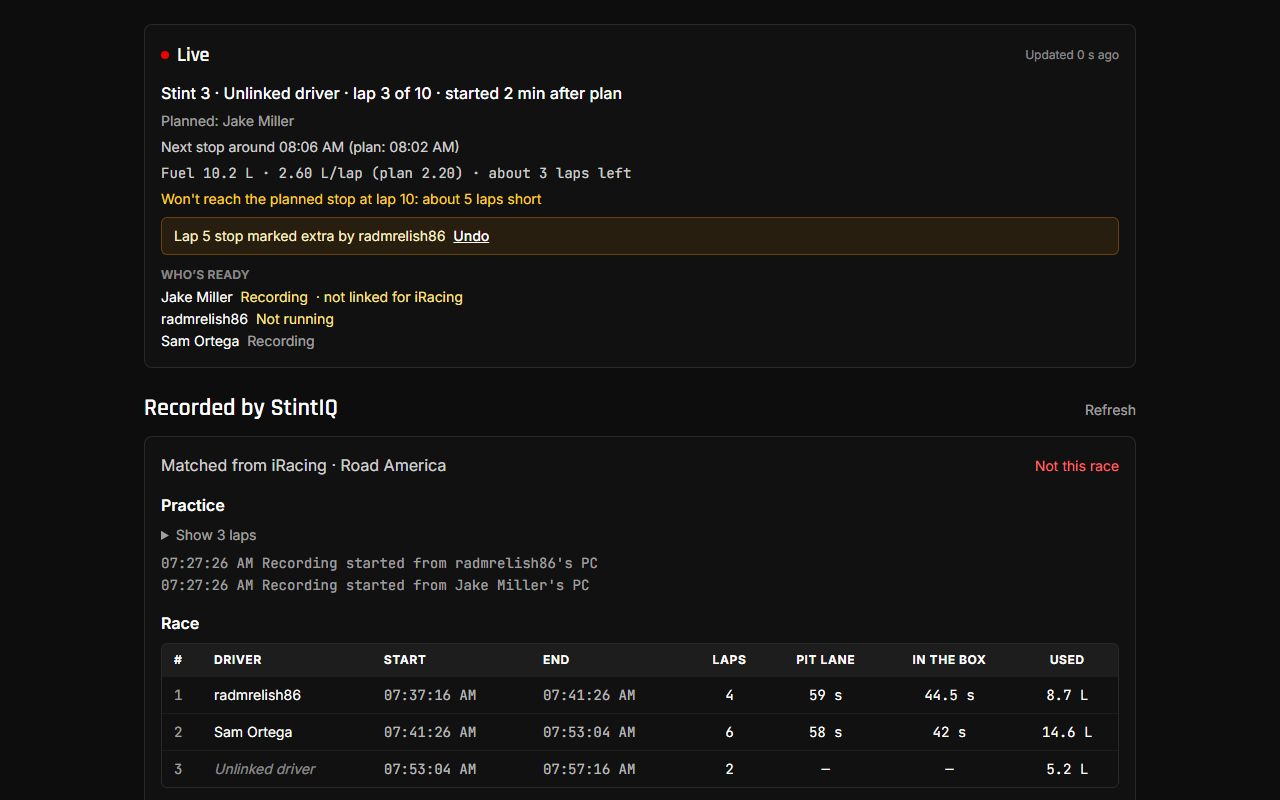
Line by line:
- "Stint 3 · Sam · lap 14 of 22 · started 3 min after plan": the planned stint the car is on, who's driving, the lap of the stint against the planned laps, and how far the stint's real start was from the plan. A stint the plan doesn't have reads "(unplanned)".
- "Planned: Jake": someone other than the planned driver is in the car. It's for information; nothing changes in the plan.
- "Next stop around 20:42 (plan: 20:38)": when the car should reach its next planned stop at its real pace, once the stint has two clean laps. Before that it shows the lap ("Next stop at lap 22").
- "Fuel 38.2 L · 3.05 L/lap (plan 3.10) · about 12 laps left": fuel left, the average of the last 3 clean laps against the plan's figure, and laps left at that rate. Le Mans Ultimate shows Energy in %.
- "Won't reach the planned stop at lap 22: about 2 laps short" (amber): at the current rate the car runs dry before the planned stop. Save fuel or plan an earlier stop.
- "Fuel: Sam's StintIQ Telemetry Agent isn't connected": in iRacing only the driving PC can see the fuel, so the driver's own agent has to be running.
- "No live data yet: nobody's StintIQ Telemetry Agent is recording this race.": the race has started, but no agent in the session is recording it. Check Who's ready.
- "Updated 6 s ago" shows the page is checking. "No new data from the car for 2 min" (amber) means no agent in the session has sent anything for that long.
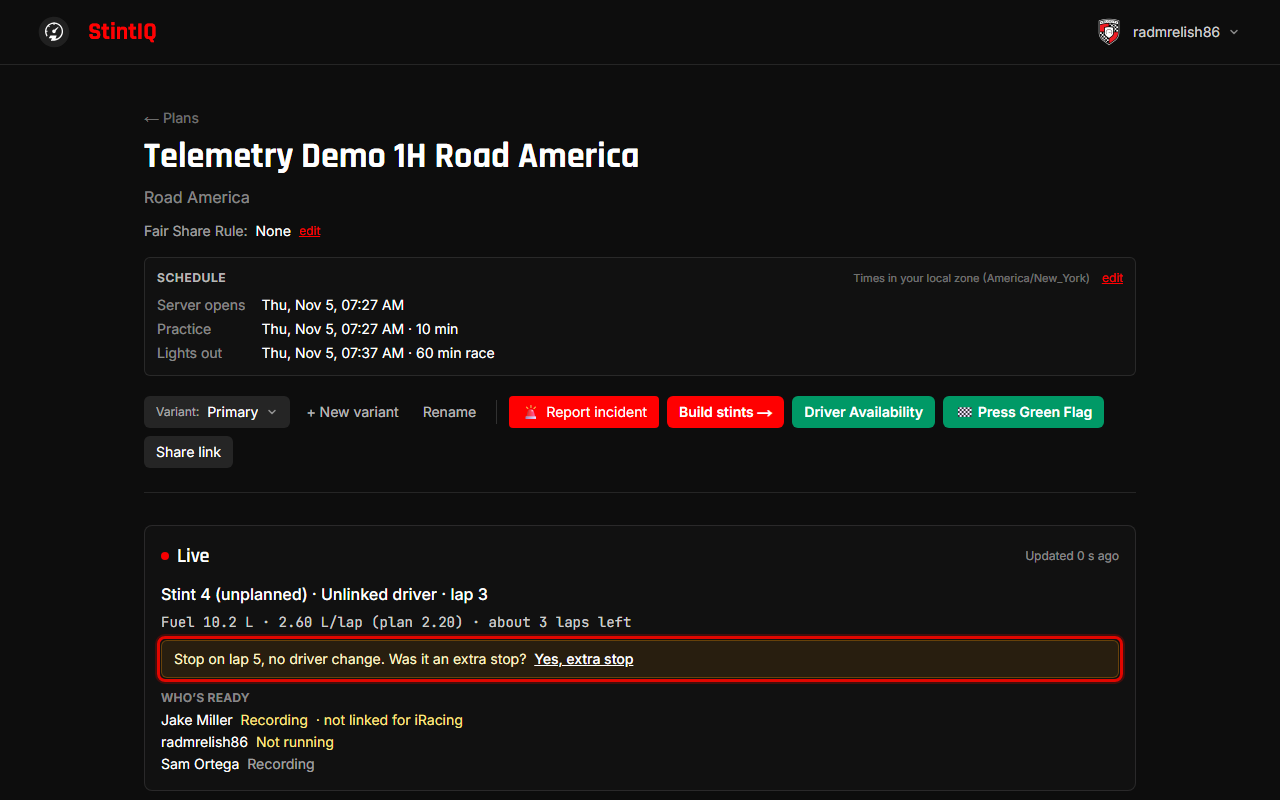
"Was it an extra stop?"
The card counts stops the way the plan does: every stop in the box ends a planned stint (or a planned refuel inside a stint longer than one tank). A stop with a driver change is the planned change, and a stop with no change near the planned lap is the planned stop. When the car stops with no driver change, more than 3 laps from the planned stop (a puncture, damage, a penalty), the card asks:
Stop on lap 9, no driver change. Was it an extra stop? Yes, extra stop
- Yes, extra stop keeps the car on the same planned stint, so the lap count and the next stop carry on from where they were.
- Ignore it if it was the planned stop, just early or late: that's how it already counts.
- Undo puts it back. Anyone on the team can answer, and the question stays until someone does.
A drive-through doesn't count as a stop: the car never stops in its box.
Against the plan, in detail
- On the race-day page, View all stints shows each race stint's real times and driver under the planned ones: "Real: 19:42–20:31 · Sam · 21 laps".
- On the plan page, the Stints card follows the race:
- A stint that's done shows when it really started, with a ✓. The stint in the car shows on track and is highlighted. When the real start is a minute or more off the plan, the planned time sits under it ("plan ≈ 20:31").
- Laps read "14 / 22", with "so far" while the stint runs.
- If someone other than the planned driver drove, "drove: Sam" appears under the name. "Unlinked driver" means the agent couldn't tell who it was (see Link your sim identity).
- Stints still ahead keep their planned ≈ times.
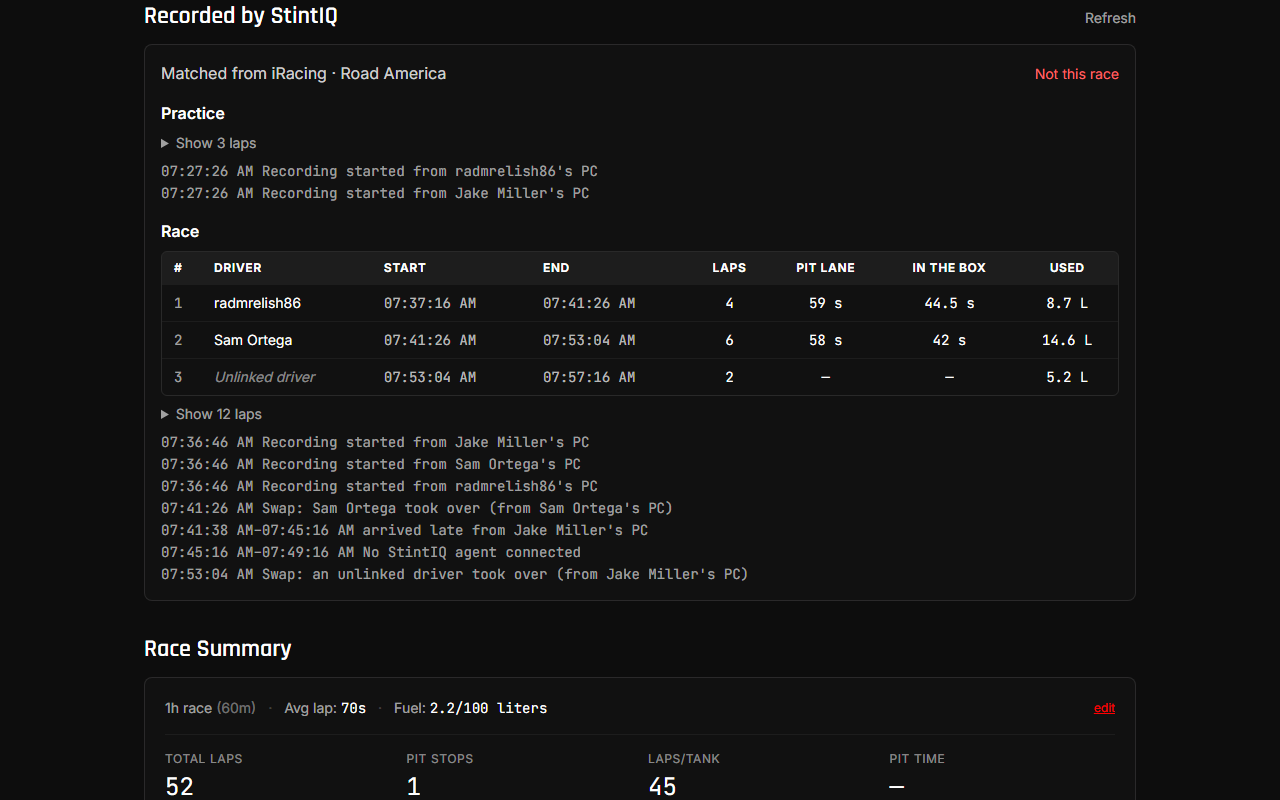
- Recorded by StintIQ (below Race Result) fills in as the race runs: each session's stints, laps and a short log.
If a PC drops out
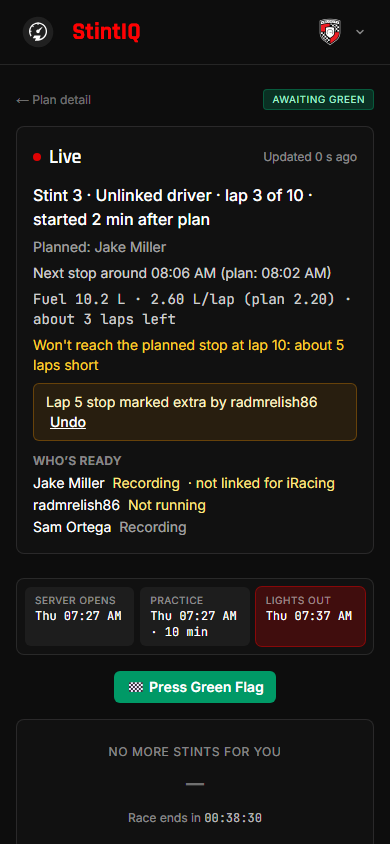
Teammates' agents keep recording the car. The PC that lost its connection saves what it saw and sends it when it's back (up to 24 hours after the race), so its laps and fuel still arrive, marked "arrived late". Pause stops only that PC, too.
After the race
Recorded by StintIQ on the plan page keeps the whole race: practice and qualifying laps, the race's stints (driver, start and end, laps, pit lane and box times, fuel or energy) and laps, and a log of swaps and gaps. A session nobody did laps in folds into one line: "Also seen: Other session (3 min, no laps)".
- Not this race (captains and admins): if the agents matched the wrong session, this deletes that recording and tells the agents to stop sending it. It can't be undone.
- Le Mans Ultimate is early: driver swaps there aren't verified at an official event yet, and the section says so.
Next steps
- Troubleshooting for an amber tray icon, a sim the agent can't read, or a driver showing as "Unlinked driver".
Have questions? Join our Discord →